Live map with jobs & technician locations
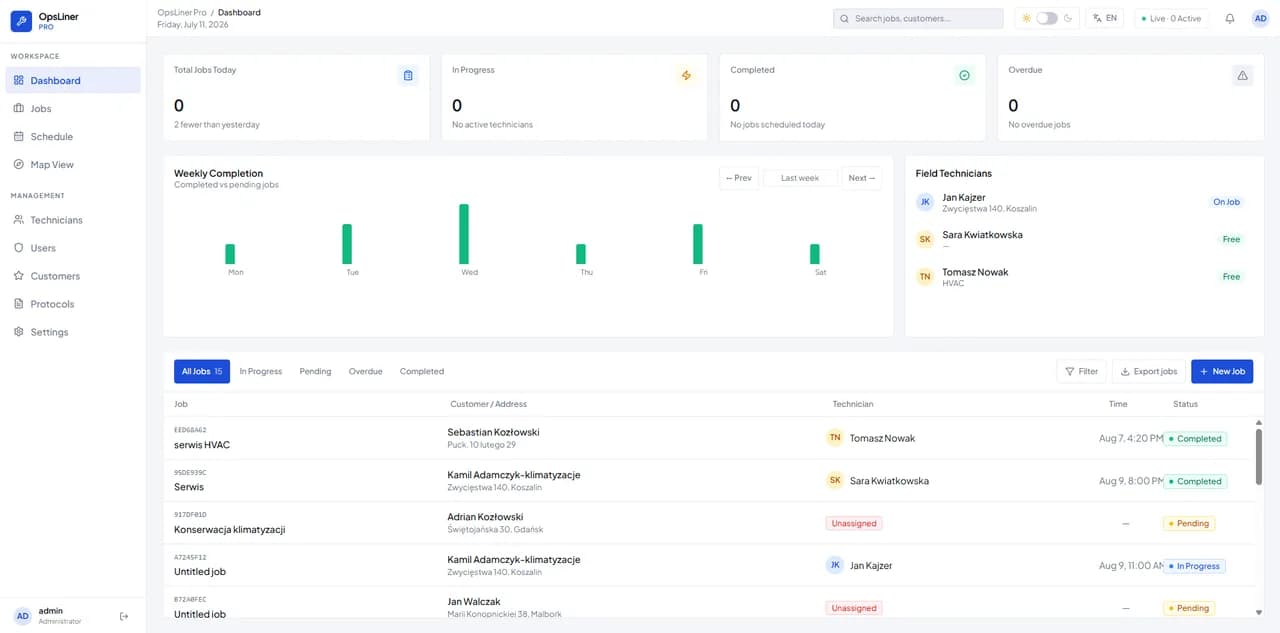
See all active jobs and live technician locations on one map. Assign work based on who is closest and react fast when priorities change.
Full field visibility — without a single phone call.
OpsLiner is the field service management platform built for mobile service teams. Dispatch jobs, see them on a map, track technician status in real time — and keep everything running even when technicians lose signal.
Offline-first mobile app
Works without signal
Live technician tracking
See your team on the map in real time
Automatic status updates
Fewer phone calls to office
Built for service businesses managing mobile teams in the field
Field service management, the hard way
Most service businesses manage their mobile teams through a patchwork of calls, WhatsApp messages, and spreadsheets. It works — until it doesn't.
Office staff spend hours calling technicians for status updates, changes, and confirmations. Every call pulls both sides away from productive work.
Dispatchers have no reliable way to see which jobs are in progress, completed, or stuck. You find out about problems only when customers complain.
When technicians enter a building, basement, or rural area, they lose their connection — and their job instructions, customer notes, and forms go with it.
Dispatchers assign work based on who answered the phone or who "usually covers that area" — not who's nearest and free right now.
Map-based dispatch vs. the old way
The same field service operation, run two different ways.
Without OpsLiner
With OpsLiner
Field service management features
OpsLiner combines dispatcher tools and a mobile technician app into a connected platform designed for real field conditions.
See all active jobs and live technician locations on one map. Assign work based on who is closest and react fast when priorities change.
Full field visibility — without a single phone call.
The technician app works fully without a connection. Jobs, customer notes, forms, and checklists are available offline and sync automatically when signal returns.
No lost data in basements, rural sites, or dead zones.
Technicians update job status with a single tap — en route, on site, completed. Office teams see changes in real time without making a single call.
Eliminate the status-check phone call.
Technicians document their work directly in the app: before and after photos, customer signatures, and job notes — all attached to the job record automatically.
Proof of work at every job, with zero paperwork.
Access a full service history for every customer and asset — previous visits, installed equipment, notes, and photos. Technicians arrive informed, not guessing.
Better first-time fix rates and fewer repeat visits.
Create and assign jobs in seconds. See every technician's current status, location, and workload on a single screen. React fast when priorities change.
More jobs dispatched. Less coordination overhead.
From dispatch to completed job
No complex onboarding. No training sessions. Your team can start dispatching real jobs in the same day you sign up.
The dispatcher creates a job — customer, location, job type, priority, and notes — then assigns it to the right technician with one click. Jobs appear instantly in the technician's mobile app.
The technician sees their job queue, customer history, and all required forms on their phone. Everything works fully offline — no signal required. Status updates with a single tap.
When the job is complete, photos, customer signatures, notes, and status changes sync automatically to the dispatcher view. No calls. No paperwork. No lost information.
Offline technician app, built by industry
OpsLiner is designed around the real workflows of service technicians — not generic software adapted for the field.
Manage seasonal demand peaks, dispatch jobs across zones on the map, and track filter replacements — all from one dispatcher screen.
Installation and service teams need offline access to technical specs and commissioning checklists — available even in remote properties.
Respond to urgent callouts fast, document pipe conditions with photos, and keep job notes linked to each property address.
Handle high job volumes with smart scheduling, capture customer signatures for warranty work, and reduce return visits.
Maintain compliance documentation, log maintenance intervals, and access elevator specifications offline at each site.
Document roadside jobs with photos, capture before and after images, and collect customer approval signatures on the spot.
Schedule preventive maintenance, track service intervals, and log equipment history — accessible offline on the factory floor.
If your business manages mobile service technicians, OpsLiner likely fits your workflow.
Dispatcher software pricing
Start with a free 30-day demo. Choose a plan and try OpsLiner with full feature access.
Up to 3 technicians
For small service businesses getting started with digital job management.
Up to 10 technicians
The best value for growing teams that need live technician tracking and a job map.
Tailored for larger teams
Need more technicians, custom workflows, or dedicated support? We'll build a plan around your operation.
Starter and Pro include a free 30-day demo. Prices are in USD and shown without VAT. See FAQ for billing questions.
Field service software FAQ
Common questions about OpsLiner, offline mode, pricing, and onboarding. Can't find what you need? Contact us.
Join service teams already using OpsLiner to reduce phone calls, improve visibility, and keep technicians productive — even offline.
No credit card required. Free demo available. Available in English and Polish.